
Install phpMyAdmin on Ubuntu server provides an intuitive interface for database administration. phpMyAdmin is a popular and user-friendly web-based tool for managing MySQL and MariaDB databases.

We’ll walk you through the process of installing phpMyAdmin on Ubuntu.
Prerequisites:
Before you begin, ensure that you have:
MySQL or MariaDB installed on your server.

Step 1: Update Package Repository
Start by updating the package repository to ensure you have the latest package information:
sudo apt update
Step 2: Install phpMyAdmin on Ubuntu
Install phpMyAdmin using the following command:
sudo apt install phpmyadmin
During the Install phpMyAdmin on Ubuntu, you will be prompted to choose a web server. Select the web server you are using (e.g., Apache or Nginx) and press Enter.
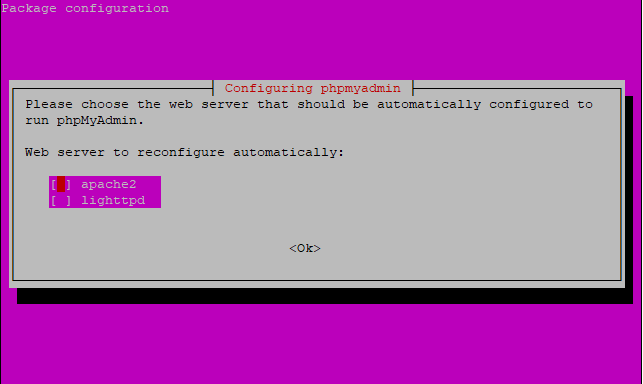
Step 3: Configure phpMyAdmin
After the Install phpMyAdmin on Ubuntu, you need to configure phpMyAdmin to work with your web server. For Apache, you can use the following command:
sudo phpenmod mbstring
sudo systemctl restart apache2
For Nginx, you may need to create a symbolic link:
sudo ln -s /etc/phpmyadmin/apache.conf /etc/nginx/conf.d/phpmyadmin.conf
sudo systemctl restart nginx
Step 4: Access phpMyAdmin
Once the Install phpMyAdmin on Ubuntu complete, Open your web browser and navigate to http://your_server_ip/phpmyadmin or http://your_domain/phpmyadmin. You should see the phpMyAdmin login page.

Step 5: Log in and Manage Databases
Log in to phpMyAdmin using your MySQL or MariaDB credentials. Once logged in, you can start managing your databases, tables, and execute SQL queries through the user-friendly interface.

Congratulations! You have successfully Install phpMyAdmin on Ubuntu server. This web-based tool simplifies database management tasks, making it easier to interact with your MySQL or MariaDB databases. If you encounter any issues, refer to the official documentation or community forums for assistance.
phpMyAdmin is a popular web-based tool for managing MySQL and MariaDB databases. It offers several advantages that make database administration more convenient and efficient:
User-Friendly Interface: phpMyAdmin provides a user-friendly web-based interface, Install phpMyAdmin on Ubuntu making it accessible to users with varying levels of technical expertise. The graphical user interface (GUI) simplifies database management tasks, allowing users to perform actions with just a few clicks.
Platform Independence: Since phpMyAdmin is a web-based tool, it can be accessed from any device with a web browser and internet connection. This platform independence makes it convenient for users to manage databases from different locations and devices.
Database Management Tasks: phpMyAdmin allows users to perform a wide range of database management tasks, including creating, modifying, and deleting databases, tables, and fields. It also supports the execution of SQL queries, enabling users to interact with the database directly.
Data Import and Export: phpMyAdmin facilitates the import and export of data in various formats. Users can easily upload data from CSV, SQL, and other file types, as well as export data for backup or analysis purposes.
Database Structure Visualization: Install phpMyAdmin on Ubuntu provides a visual representation of the database structure, making it easier for users to understand the relationships between tables, fields, and indexes. This can be particularly helpful for database designers and administrators.
SQL Query Execution: Users can execute SQL queries directly through phpMyAdmin, allowing for more advanced database operations. This feature is valuable for users who are comfortable writing SQL statements and need to perform complex tasks.
User and Permission Management: phpMyAdmin enables administrators to manage database users and their permissions. This includes creating, modifying, and deleting user accounts, as well as assigning specific privileges for different databases and tables.
Server Status Monitoring: Install phpMyAdmin on Ubuntu provides information about the server status, including current connections, server variables, and system processes. This monitoring feature can be useful for administrators in maintaining the health and performance of the database server.
Open Source and Free: phpMyAdmin is open-source software, meaning it is freely available for use and modification. This makes it a cost-effective solution for individuals and organizations that need a robust database management tool without incurring additional licensing fees.
While phpMyAdmin offers many advantages, it’s essential to ensure proper security measures are in place, such as using strong authentication mechanisms and keeping the software up-to-date, to protect sensitive data from unauthorized access.

