
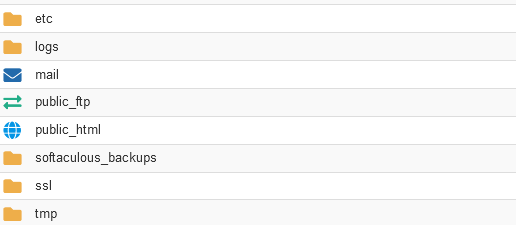
Default Files in cPanel serve crucial roles in organizing and managing the website’s content and configuration. The “public_html” directory acts as the web root, housing all publicly accessible files for the site. Within it, files like “index.html” or “index.php” serve as default landing pages. The “cgi-bin” directory is reserved for CGI scripts, facilitating dynamic content generation. Configuration settings are often managed through the “.htaccess” file, enabling features like URL redirection and access control.

Additionally, log files such as “error_log” and “access_log” record errors and website accesses, aiding in troubleshooting and analytics. A “tmp” directory provides a location for temporary files utilized by various processes. These default components collectively form the foundational structure of a cPanel account, streamlining website management and operation.
Default Files in cPanel are listed below
public_html:
This is the primary web directory where all the files for your website should be placed. When visitors access your domain, the files within this directory are what they see.
cgi-bin:
This directory is used for storing CGI scripts. CGI (Common Gateway Interface) scripts are often used for dynamic content generation or processing form data.
.htaccess:
This is a configuration file used by the Apache web server to control various aspects of your website’s behavior, such as URL redirection, access control, and more.
error_log:
This file logs errors that occur on your website. It can be useful for troubleshooting issues with your site.
access_log:
This file logs access to your website, recording information such as IP addresses, requested URLs, and more.
index.html or index.php:
These are default filenames for the homepage of your website. When a visitor accesses your domain without specifying a particular file, the server looks for one of these files to display as the homepage.
tmp:
This directory is used for storing temporary files. It may be used by various applications or scripts running on your website.
These are some of the most common Default Files in cPanel account. However, the exact structure may vary depending on the hosting provider and any customizations that have been made.

Default files in cPanel are essential components for the proper functioning and management of websites hosted on cPanel servers. Their importance lies in several key aspects:
- Organizational Structure: The Default Files in cPanel provide a standardized organizational structure for website files, ensuring that web content is stored in the correct locations. This makes it easier for website administrators to manage and locate files.
- Web Content Accessibility: The “public_html” directory serves as the web root, containing files that are publicly accessible to website visitors. Without this directory and its Default Files in cPanel, web servers would not know where to look for website content, resulting in inaccessible websites.
- Configuration and Customization: Files like “.htaccess” enable website administrators to configure various aspects of their website, such as URL rewriting, access control, and error handling. These configuration files allow for customization and optimization of website functionality.
- Script Execution: The “cgi-bin” directory is crucial for executing CGI scripts, which are often used for dynamic content generation, form processing, and other interactive features on websites. Without this directory, certain website functionalities may not work as intended.
- Logging and Troubleshooting: Log files like “error_log” and “access_log” provide valuable information about website errors, visitor traffic, and server activity. These logs are instrumental in troubleshooting issues, monitoring website performance, and identifying security threats.
- Temporary File Management: The “tmp” directory serves as a temporary storage location for files generated by various processes running on the server. Proper management of temporary files helps optimize server resources and maintain system efficiency.
Overall, Default Files in cPanel play a crucial role in the structure, functionality, and management of websites hosted on cPanel servers. They provide the foundation upon which websites are built and maintained, ensuring smooth operation and optimal performance.


