Skip to content

Webhosting Delhi

webhostingdelhi

  • Home
  • Home
  • Plesk
  • How to Remove/Delete an Email Account in Plesk

How to Remove/Delete an Email Account in Plesk

September 14, 2024September 14, 2024 Aryan chawla

To remove or delete an email account in Plesk, If you’re managing your website’s hosting via Plesk and need to clean up your email accounts, removing or deleting an unused or outdated email account is straightforward. Plesk offers an intuitive interface to manage email accounts tied to your domains, and you can delete accounts in just a few steps. Whether you’re streamlining your email setup or freeing up server space, this guide will walk you through the process of safely removing an email account in Plesk.

Follow these steps:

  • Log in to Plesk:
  • Navigate to Mail Accounts:
  • Select the Domain:
  • Find the Email Account:
  • Delete an Email Account in Plesk:
  • Confirm Deletion:
  • Check for Confirmation:

Log in to Plesk:

  • Open your web browser and go to your Plesk login page.
  • Enter your username and password to log in.
Set Up ASP.NET Version in Plesk

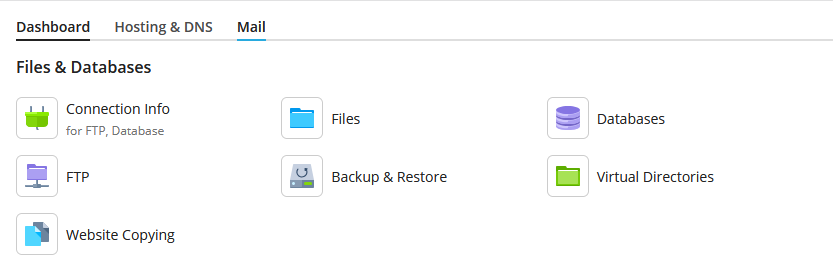
Navigate to Mail Accounts:

  • Once logged in, go to the “Mail” section in the Right-hand sidebar.
Select the Domain:

  • If you have multiple domains, select the domain associated with the email account you want to delete.

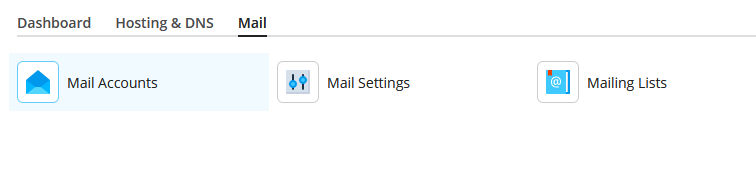
Find the Email Account:

  • Click on “Email Accounts” (or similar) to view a list of existing email accounts for that domain.
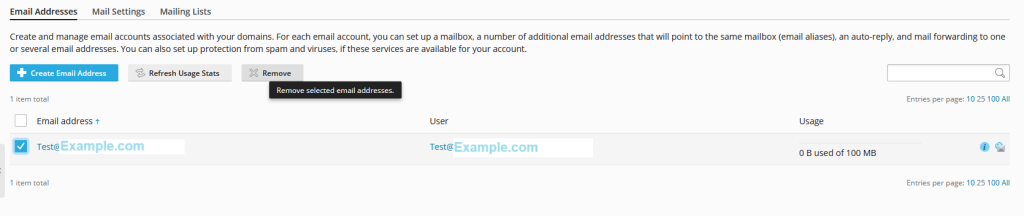
Delete an Email Account in Plesk:

  • Locate the email account you want to remove.
  • Click the “Remove” or “Delete” button next to the email account. You may be prompted to confirm the deletion.
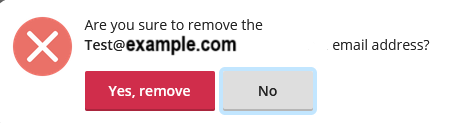
Confirm Deletion:

  • Confirm that you want to delete the account when prompted. This action will remove the email account and all associated data.
Delete an Email Account in Plesk

Check for Confirmation:

  • You should receive a confirmation message or see that the email account is no longer listed.

Be aware that deleting an email account will also delete all emails associated with it. Make sure to back up any important emails before deleting the account.

PleskTagged: Delete an Email Account in Plesk

Post navigation

How to locate .htaccess file in Cpanel ?
FTP account creation in cPanel

Related Posts

How to set hotlink protection in Plesk ?

Hotlink protection in Plesk to prevent unauthorized users from embedding your content, such as images or videos, directly on their websites. This guide explains how to enable hotlink protection in Plesk for your website in Plesk. Follow these steps carefully to ensure your website’s content remains secure. What Is Hotlink Protection? Hotlinking occurs when another […]

How to Set Up ASP.NET Version in Plesk ?

Set Up ASP.NET Version in Plesk is a straightforward process. Plesk is a popular web hosting control panel that allows users to manage their hosting accounts with a web-based interface. It supports various programming languages, including ASP.NET, which is crucial for websites built with Microsoft technologies. After logging into the Plesk control panel, you navigate […]

How to Change the Domain in Plesk ?

Change the Domain in Plesk, Its one of the most widely used web hosting control panels, offering an intuitive interface to manage websites, domains, and hosting services. Changing the domain in Plesk is a straightforward process, but it’s important to follow the steps carefully to avoid disruptions to your website’s functionality. This blog will guide […]

Recent Posts

  • How to Check CPU and Memory Usage in cPanel
  • How to Change the Domain in Plesk ?
  • How to set hotlink protection in Plesk ?
  • How to View Error Log in cPanel ?
  • How to Change TimeZone on Ubuntu ?

Recent Comments

No comments to show.

Archives

  • December 2024
  • November 2024
  • October 2024
  • September 2024
  • August 2024
  • July 2024
  • June 2024
  • May 2024
  • April 2024
  • March 2024
  • February 2024
  • January 2024
  • December 2023

Categories

  • Control panel
  • cpanel
  • DirectAdmin
  • Domain
  • FTP
  • Linux command
  • mail
  • MariaDB
  • MySQL
  • Plesk
  • SSH
  • SSL
  • Ubuntu
  • Uncategorized
  • VPS
  • Webuzo
  • WHM
  • Wordpress

Copyright © 2026 Webhosting Delhi | Marvel Blog by Ascendoor | Powered by WordPress.