
cPanel Email Features and Benefit, When it comes to managing email accounts for your business or personal use, cPanel provides a powerful suite of tools designed to make email management simple and efficient. In this blog post, we’ll dive into the various features of cPanel’s email system and explore the benefits they offer.
Cpanel Email Features and Benefit
1. User-Friendly Interface
cPanel offers an intuitive and easy-to-navigate interface for managing email accounts. Whether you’re setting up a new email account, configuring forwarders, or managing spam filters, cPanel’s interface streamlines these tasks with straightforward options and clear labels.

2. Email Account Management
With cPanel, you can create and manage multiple email accounts with ease. The platform allows you to set up new email addresses, configure mailbox quotas, and delete accounts as needed. cPanel Email Features and Benefit flexibility is ideal for businesses and individuals who require multiple email addresses for different purposes.

3. Email Forwarding and Auto-Responders
cPanel makes it simple to set up email forwarding and auto-responders. Email forwarding ensures that messages sent to one address are automatically redirected to another, which is useful for consolidating communications. Auto-responders, on the other hand, cPanel Email Features and Benefit allow you to send automated replies, such as vacation messages or confirmation emails, without manual intervention.

4. Spam Protection
Spam can be a significant issue for email users. cPanel includes built-in spam protection features like SpamAssassin, which helps to filter out unwanted emails. You can configure the spam filter’s sensitivity to reduce the amount of junk mail that reaches your inbox, keeping your email experience cleaner and more manageable.

5. Email Filtering
cPanel provides robust email filtering options that let you create rules to manage incoming and outgoing messages. You can set up filters based on various criteria such as sender, subject line, or content, which helps organize your inbox and ensure important emails are prioritized. cPanel Email Features and Benefit

6. Webmail Access
For users who prefer not to use a traditional email client, cPanel offers webmail access. This feature allows you to check your email from any web browser using popular webmail clients like Roundcube, SquirrelMail, or Horde. It’s a convenient option for accessing your email from different locations or devices.

7. Email Authentication
To enhance security, cPanel supports email authentication protocols like SPF (Sender Policy Framework) and DKIM (DomainKeys Identified Mail). cPanel Email Features and Benefit These technologies help verify the authenticity of your emails, reducing the risk of your messages being marked as spam or falling victim to phishing attacks.

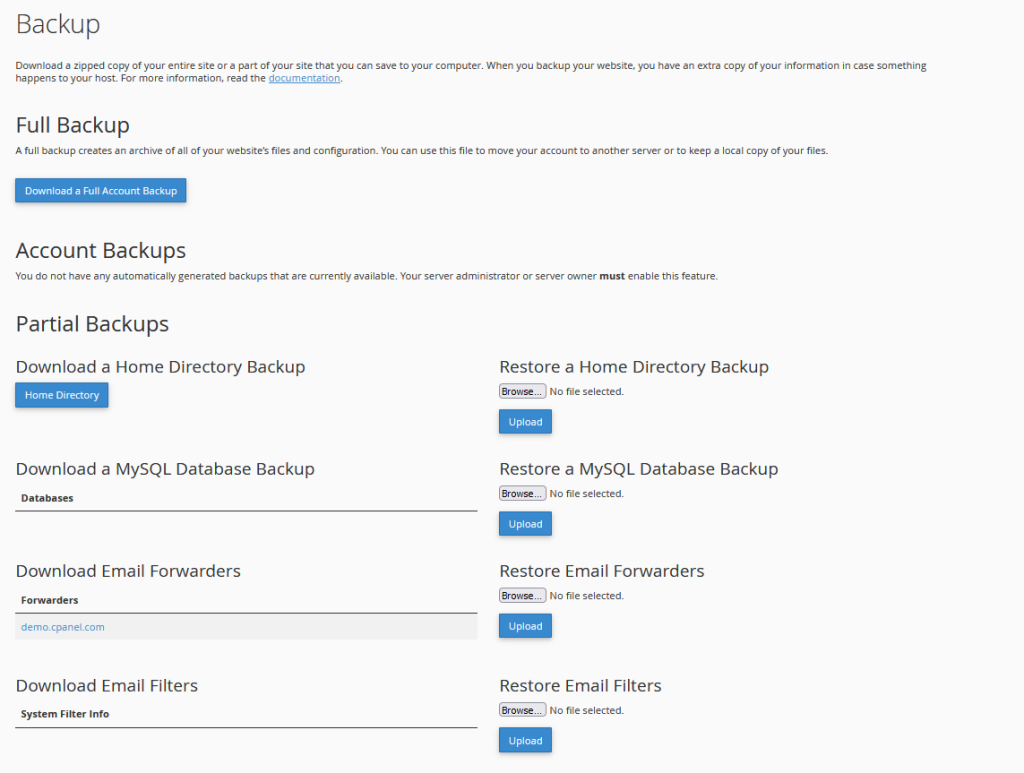
8. Email Account Backups
Backing up your email data is crucial for protecting against data loss. cPanel offers options for backing up email accounts, ensuring that you can recover your messages if needed. Regular backups help safeguard your important communications and attachments.
9. Integration with Other Services
cPanel’s email system integrates seamlessly with other features of the cPanel platform. You can manage email settings alongside your website, databases, and other hosting services, providing a unified approach to managing your online presence. cPanel Email Features and Benefit
10. Mobile Compatibility
In today’s mobile-centric world, having access to your email on the go is essential. cPanel’s email services are compatible with various mobile email clients, allowing you to configure your email accounts on smartphones and tablets for convenient access wherever you are.
cPanel Email Features and Benefit offer a comprehensive set of tools designed to enhance your email management experience. From user-friendly account management and spam protection to advanced filtering and authentication, cPanel provides the functionality needed to effectively handle your email needs. Whether you’re running a business or managing personal email accounts, cPanel’s robust features ensure that your email system operates smoothly and securely.


